
 Doc Summary

How to give each user only the access they need, using roles (what they can do) and divisions (which records they see).
Note: Applies to: system administrators (admin role).
The Two Controls #
| Control | Limits | Set in |
|---|---|---|
| Role | What the user can do in each module: read, create, edit, delete, manage dropdowns. | Set up > Users > the user > Roles |
| Division | Which records they see, but only when their role in that module is a divisional (_div_) role. | Set up > Users > the user > Divisions |
Limiting What a User Can Do #
- Click the Set up spanner at the bottom left, select Users and open the user.
- In Roles, tick one role for each module they use, choosing the lowest role that does the job: – read only:
module_general_viewer– update their own actions:module_action_assignee– edit their own records:module_record_owner– manage all records but not delete:module_manager
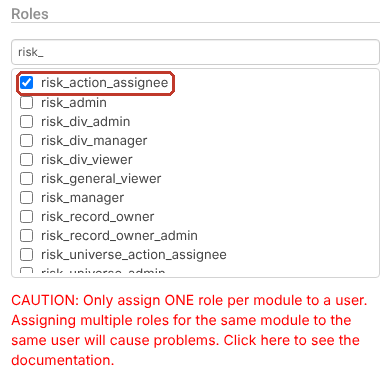
Critical: Only one role per module. Adding a second, lower role for the same module (for example risk_action_assignee alongside risk_admin) restricts the user to the lower role.
Limiting Which Records a User Sees #
- Give the user a divisional role for the module, for example
risk_div_managerorincident_div_viewer. - In Divisions, tick the highest division they need.
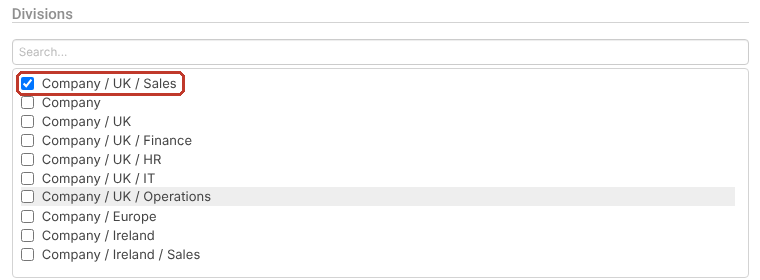
- Click Save.
The user now sees records in that division and below, never above. For example, a user with risk_div_viewer and Company/UK/Sales sees risks for UK Sales only.
Note: A non-divisional role (for example audit_manager) ignores divisions, so the same user would still see every audit. Check each module’s role separately.
Examples #
| Requirement | Roles | Divisions |
|---|---|---|
| Department head manages their department’s risks and incidents | risk_div_manager, incident_div_manager | Company/UK/Finance |
| Regional viewer reads risks for two sales teams | risk_div_viewer | Company/UK/Sales, Company/Ireland/Sales |
| Staff member reports incidents only | incident_reporter | Their department |
| Auditor manages every audit, sees only UK risks | audit_manager, risk_div_viewer | Company/UK |
Tip: Review access monthly. The System User Details report lists every user’s roles, divisions and last login.


