
Skip to content
Symbiant System Black Logo
  • Home
  • Knowledge Base
  • Symbiant Website
  • Symbiant Changelog
  • Submit a Ticket
  • My Support Tickets
  • Home
  • Knowledge Base
  • Symbiant Website
  • Symbiant Changelog
  • Submit a Ticket
  • My Support Tickets
Popular Keywords importuserdivisionsamlimport risk

Admin Basics

  • Creating/Adding Users
  • Delete a User

User FAQ

  • Login Issues

Automated Emails (Task Based)

  • How to Receive Module Specific Emails as System Admin (Trigger) and (Scheduler)

Risk FAQ

  • What is DFA?
  • What is Risk Family?
  • How do I Close a Risk?
  • How do I Export Risk Data?
  • Why are some Risks highlighted in Red?
  • How do I assign a specific Risk to a specific Register?
  • Why are certain Risk Scores showing differently on the dashboard?

Automated Email Reminders (Time Based)

  • How to Receive Module Specific Emails as System Admin (Trigger) and (Scheduler)

System Errors & Issues

  • Login Issues

System Setup

  • Creating/Adding Users
  • Delete a User
  • Login Issues

Admin FAQ

  • Limiting Access of Users in Symbiant
  • How do I view my current Licensed Seats?
  • Seat Types
  • Symbiant System Best Practices
  • Login Issues
  • Not Receiving Symbiant Emails
  • Creating/Adding Users
  • How do I view details of my Users?
  • Delete a User
  • How do I assign a specific Record to a specific User?
  • How do I assign a specific Record to a specific Division?
  • Moving Divisions (Restructuring)
  • What are the differences between dropdown options? (E.g. Type & Category)
  • What is DE and FA in Email Notifications?
  • How to Receive Module Specific Emails as System Admin (Trigger) and (Scheduler)
  • Editing a Guidance Tab (E.g. Impact Guidance)
  • Renaming a System Menu Option

Admin Risk FAQ

  • What is DFA?
  • What is Risk Family?
  • How do I Close a Risk?
  • How do I Export Risk Data?
  • How do I change a Risk Score Colour?
  • Why are some Risks highlighted in Red?
  • Why are new risks not showing up?
  • How do I assign a specific Risk to a specific Register?
  • Why are certain Risk Scores showing differently on the dashboard?
  • Editing a Guidance Tab (E.g. Impact Guidance)

System FAQ

  • Creating/Adding Users
  • Login Issues
  • Not Receiving Symbiant Emails

Account FAQ

  • Creating/Adding Users
  • Login Issues
  • Not Receiving Symbiant Emails
View Categories
  • Home
  • Knowledge Base
  • Admin FAQ
  • Admin FAQ
  • What are the differences between dropdown options? (E.g. Type & Category)

What are the differences between dropdown options? (E.g. Type & Category)

0:00 / 1:12
  • View as Markdown Open this page as plain Markdown (opens in a new tab)
  • Open in ChatGPT Ask questions about this page (opens in a new tab)
  • Open in Claude Ask questions about this page (opens in a new tab)
  • Open in Google AI Studio Ask questions about this page (Google account required) (opens in a new tab)
AI Doc Summarizer Doc Summary
AI Doc Summarizer Thinking Thinking

Dropdown Types #

Symbiant has two main kinds of drop-down field: single select and multi-select. They look and behave differently.

Single Select #

A single-select drop-down lets you pick one option from a list. Each option can have its own colour, which is used in grids and charts.
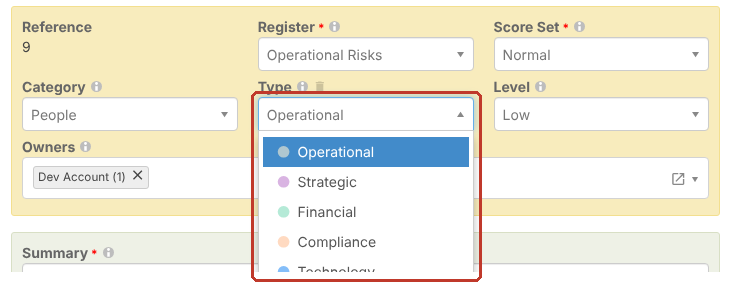
A single-select drop-down

Multi-Select #

A multi-select lets you pick more than one option. Each choice shows as a tag in the field, and you remove one by clicking its ×. A multi-select can also limit how many options you can pick.

A multi-select field with one choice

Why Are There Two Similar Fields? #

Two drop-downs of the same kind work in exactly the same way. The difference is only how you use them to group your data.

For example, on a risk, Type and Category are both single-select drop-downs. Each has its own list of options and colours, so you can group risks two different ways. You might use Type as the main grouping and Category as a sub-grouping, or the other way round. It’s entirely up to you.

You set each list’s options under the module’s stubs. See Creating Dropdown Option Selections.

Tip: If you only need one of the two fields, you can hide the other from your views. See Editing a View.

Setup
Did this help?

Share This Article :

  • Facebook
  • X
  • LinkedIn
Require Additional Information? Please Contact Support

How can we help?

Updated on 30 October 2026
Moving Divisions (Restructuring)What is DE and FA in Email Notifications?
Table of Contents
  • Dropdown Types
  • Single Select
  • Multi-Select
  • Why Are There Two Similar Fields?
Symbiant System White Logo

20-22 Wenlock Road

London

N1 7GU

Linkedin
Telephone Numbers
  • UK - 0113 5263 755
  • Support - 0204 5514 735 option 2
  • USA - 347 991 7130
Information
  • Home
  • Knowledge Base
  • Symbiant Website
  • Submit A Ticket
  • Change Requests
  • Support Staff Login

Copyright © 2025 Symbiant All Rights Reserved - Risk, Audit and Compliance Management Software

We use cookies on our website to give you the most relevant experience by remembering your preferences and repeat visits. By clicking “Accept All”, you consent to the use of ALL the cookies. However, you may visit "Cookie Settings" to provide a controlled consent.
Cookie SettingsAccept All
Manage consent

Privacy Overview

This website uses cookies to improve your experience while you navigate through the website. Out of these, the cookies that are categorized as necessary are stored on your browser as they are essential for the working of basic functionalities of the website. We also use third-party cookies that help us analyze and understand how you use this website. These cookies will be stored in your browser only with your consent. You also have the option to opt-out of these cookies. But opting out of some of these cookies may affect your browsing experience.
Necessary
Always Enabled
Necessary cookies are absolutely essential for the website to function properly. These cookies ensure basic functionalities and security features of the website, anonymously.
CookieDurationDescription
cookielawinfo-checkbox-analytics11 monthsThis cookie is set by GDPR Cookie Consent plugin. The cookie is used to store the user consent for the cookies in the category "Analytics".
cookielawinfo-checkbox-functional11 monthsThe cookie is set by GDPR cookie consent to record the user consent for the cookies in the category "Functional".
cookielawinfo-checkbox-necessary11 monthsThis cookie is set by GDPR Cookie Consent plugin. The cookies is used to store the user consent for the cookies in the category "Necessary".
cookielawinfo-checkbox-others11 monthsThis cookie is set by GDPR Cookie Consent plugin. The cookie is used to store the user consent for the cookies in the category "Other.
cookielawinfo-checkbox-performance11 monthsThis cookie is set by GDPR Cookie Consent plugin. The cookie is used to store the user consent for the cookies in the category "Performance".
viewed_cookie_policy11 monthsThe cookie is set by the GDPR Cookie Consent plugin and is used to store whether or not user has consented to the use of cookies. It does not store any personal data.
Analytics
Analytical cookies are used to understand how visitors interact with the website. These cookies help provide information on metrics the number of visitors, bounce rate, traffic source, etc.
SAVE & ACCEPT
Loading...

Insert/edit link

Enter the destination URL

Or link to existing content

    No search term specified. Showing recent items. Search or use up and down arrow keys to select an item.
