Doc Summary

Issue: Some sites have pairs of scheduled email notifications with the same name apart from DE or FA, and it isn’t clear which to activate.
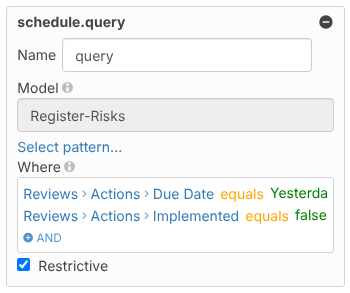
Cause: The letters describe the check inside the schedule’s query:
- DE = Doesn’t Exist: the field has never had a value. For example, an action whose Implemented box has never been ticked.
- FA = False: the field has a value of false. For example, an action that was ticked as Implemented and later unticked.
An overdue action reminder has to catch both cases, so older configurations split it into two schedules that do the same job with different checks.
Fix: Activate both schedules of a DE/FA pair, otherwise some overdue records are missed. See Activating and Deactivating an Automated Email.
Note: The current shipped schedules (named
...-generic) don’t come in DE/FA pairs. Each reminder is a single schedule, so there is no pair to activate. For example, the shipped action overdue reminder checks Due Date equals Yesterday and Implemented equals false in one query.