
 Doc Summary

How to create a new Risk Register. You need at least one register before risks will show in the Risk Registers dashboard.
Applies to: Risk admins and system admins · Module: Register Risks
Adding a Register #
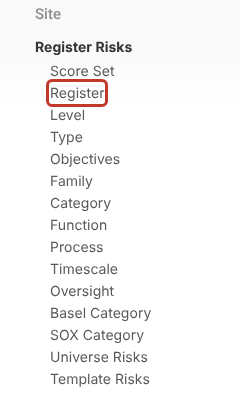
Select Register Risks in the left-hand menu, then select the Register stub underneath it.
Select the + icon at the top right to add a new register.

Enter a name for the Register (for example “Compliance Risks”), choose a Colour if you want one, and give it a Sort Order. The sort order sets where the register appears in dropdowns and charts.

Note: Keep register names to 31 characters or fewer if you want to generate Excel Risk Register reports. Excel worksheet names can’t be longer than that.
Saving the Register #
When finished, select Save at the top right.

The new register now appears in the list and can be chosen in the Register field of any risk.
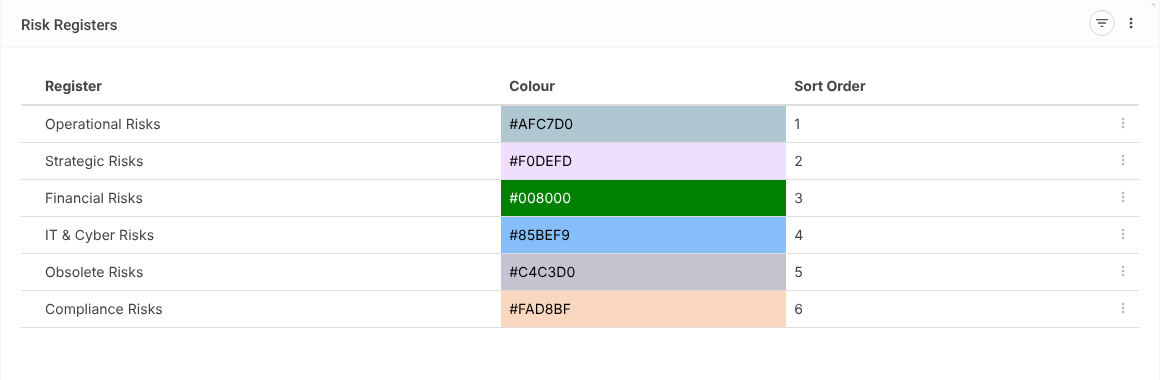
Note: To use a register as a way of closing risks (for example an “Obsolete Risks” register), see How do I Close a Risk?.


