
 Doc Summary

Issue: When you click Save, a red Data Conflict! message appears and the record isn’t saved.
Cause: Symbiant protects records from being overwritten by accident. If two people have the same record open, and one of them saves a change to a field, the other person’s screen is now out of date. When the second person saves a different value in that same field, Symbiant stops the save rather than silently undo the first person’s work.
Note: If the two people changed different fields, Symbiant merges both changes and saves normally. A conflict only happens when the same field was changed.
Fix:
- Click reload data in the message (or click the Sync icon at the top and choose Reload data).
- Symbiant loads the latest saved version. Where your version and the saved version differ, the other value is shown under the field with an Insert option.
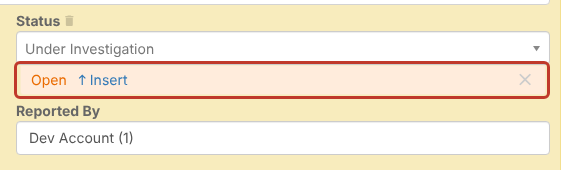
- Check the change. Click Insert to use the value shown under the field, or leave the field as it is.
- Click Save.
Tip: To avoid conflicts, close records you are not working on and don’t leave records open in several browser tabs.


