
 Doc Summary

How to record an action plan on a BCP resource and assign actions with due dates.
Applies to: users who can edit BCP resources. Module: BCP Resources and Actions.
Adding the Plan #
- Open the resource and select Edit Resource (or start from a new resource).
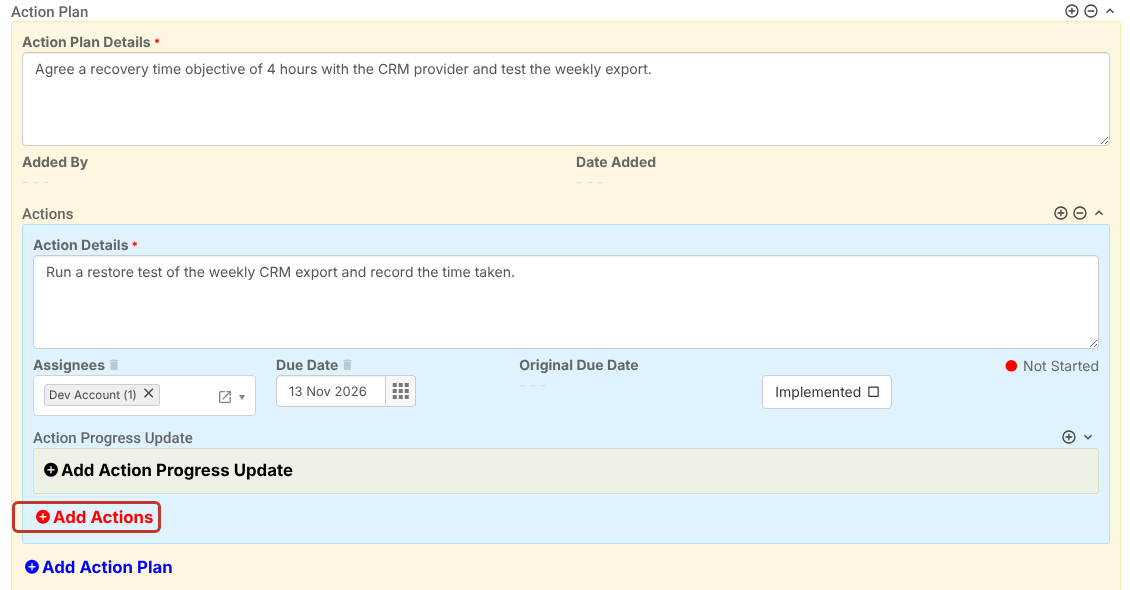
- Scroll to Action Plan and click Add Action Plan.
- Enter the Action Plan Details (required). Added By and Date Added fill in when you save.
Adding Actions #
- Inside the plan, click Add Actions.
- Enter the Action Details (required).
- Choose the Assignees.
- Pick a Due Date from the calendar. The Original Due Date is kept if the due date changes later.
- Click Add Actions again for more actions, or Add Action Plan for another plan.
Saving #
Click Save. Each action shows a status (Not Started, In-Progress once a progress update is added) and appears in the Actions module for its assignees.
Note: Assignees are emailed when an action is assigned, and reminded before and after the due date, only if your administrator has switched on the matching automated emails.


