
 Doc Summary

An introduction to the Service Desk module, used to raise and track internal support tickets such as general queries and information security reports.
Applies to: all users with a Service Desk role. Module: Service Desk.
The Dashboard #
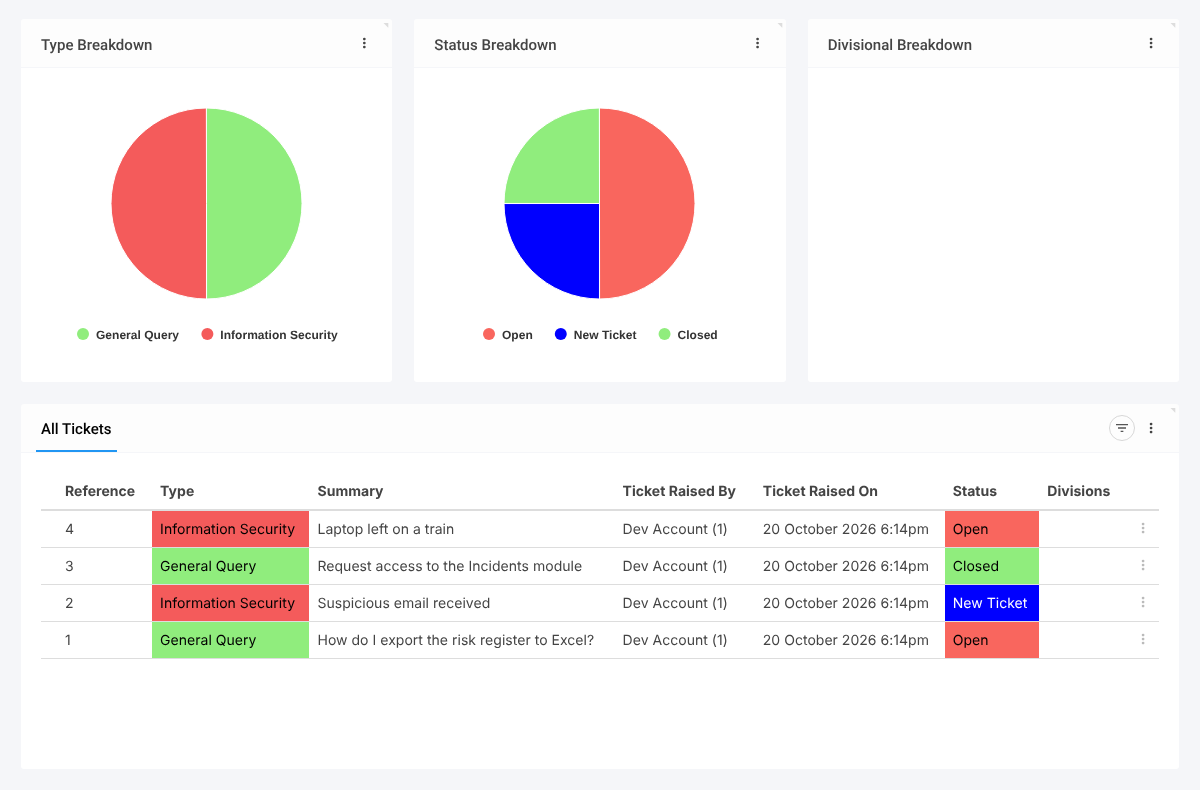
Select Service Desk in the left-hand menu. Charts show the Type, Status and Divisional breakdowns, and the All Tickets grid lists each ticket with its type, summary, who raised it and when, status and divisions.
Ticket Types and Statuses #
- General Query: a question or request for help.
- Information Security: a security event; the ticket asks for the affected systems, when it occurred, and whether it is resolved, exposed data or caused an outage.
- Statuses: New Ticket (set automatically when a ticket is raised), Open and Closed.
Inside a ticket, the tabs are Overview, Edit Ticket, Comments and Attachments.
Admins maintain Type, Status, Attachment Types, Comment Type and Affected Systems under Service Desk in the menu.
Note: Ticket types and statuses can be used by automated emails. Check with your administrator before renaming or deleting them.


