
 Doc Summary

How to sign out of Symbiant, and what happens when you’re inactive for a while.
Signing Out #
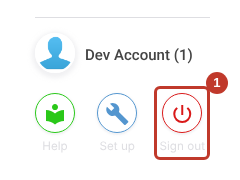
- Click Sign out at the bottom left (1).
- Click Yes, Logout! (1) to confirm, or No, Cancel (2) to stay signed in.
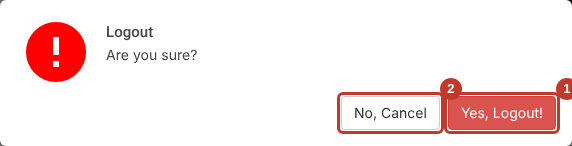
You’re returned to the sign-in page.
Critical: Save any record you’re working on before you sign out. Unsaved changes are lost.
Tip: Signing out and back in also refreshes the files Symbiant keeps in your browser. It’s the first thing to try if something doesn’t look right. See Resolving System Issues.
Session Timeout #
For security, Symbiant signs you out after a period of inactivity. When that happens you need to sign in again. The Symbiant System Timeout Flow article explains the timeout in detail.
To avoid losing work:
- Save records regularly. Save and Edit saves without closing the record. See Saving a Record.
- Don’t leave a record open and unsaved when you step away.


