
 Doc Summary

How record statuses and action states work in Symbiant, using Incidents as the example.
Record Statuses #
Most modules have a Status field that shows where a record is in its workflow. For example, an incident moves from Open to Under Investigation to Closed.
To change a record’s status, open the record, pick the new value in Status and save. See Editing a Record.
Statuses are coloured, and the colours are used on the dashboard charts and in the record grid so you can see progress at a glance.
How Statuses Are Set Up (Administrators) #
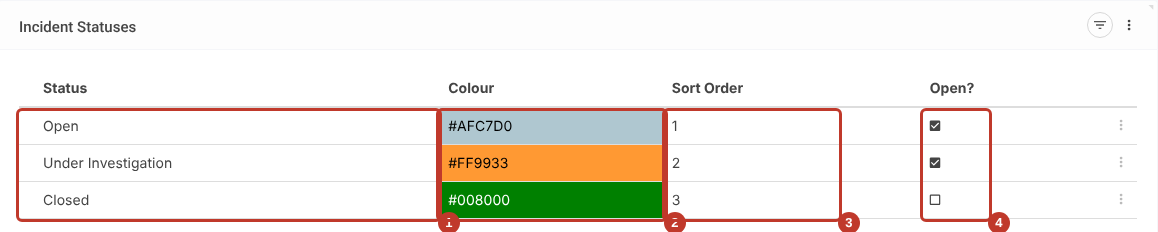
Each module’s statuses are a dropdown list that administrators manage. In Incidents, select Status under Incidents in the left-hand menu. Each status has:
- A name.
- A colour, used in charts and grids.
- A sort order, which sets the order in dropdowns and charts.
- An Open? tick, which shows whether records with this status still count as open.
Note: Changing a status name or colour changes it for everyone. Some modules use status values in their reports, reminders or rules, so check with Symbiant Support before renaming or removing a status.
Action States #
Actions on the Reviews & Actions tab have their own state, which Symbiant sets for you:
| State | When |
|---|---|
| Not Started | The action has no due date yet |
| In-Progress | A due date has been set |
| Complete | Implemented has been ticked |

See Reviews & Actions for more.
Other Modules #
Some modules have their own status logic, for example document approval. See Document Status Logic.


